Report & Enforcement
How to report a problem, what TradeUpGames reviews, and the actions we take to keep the community safe.
File a Report
Log in to file a report
You need a TradeUpGames account to submit a report. This keeps reports tied to real member accounts and helps our team review them.
Log in to continueReport & Enforcement Safety Center
Report bad trades, unsafe behavior, fake listings, scams, and rule violations.
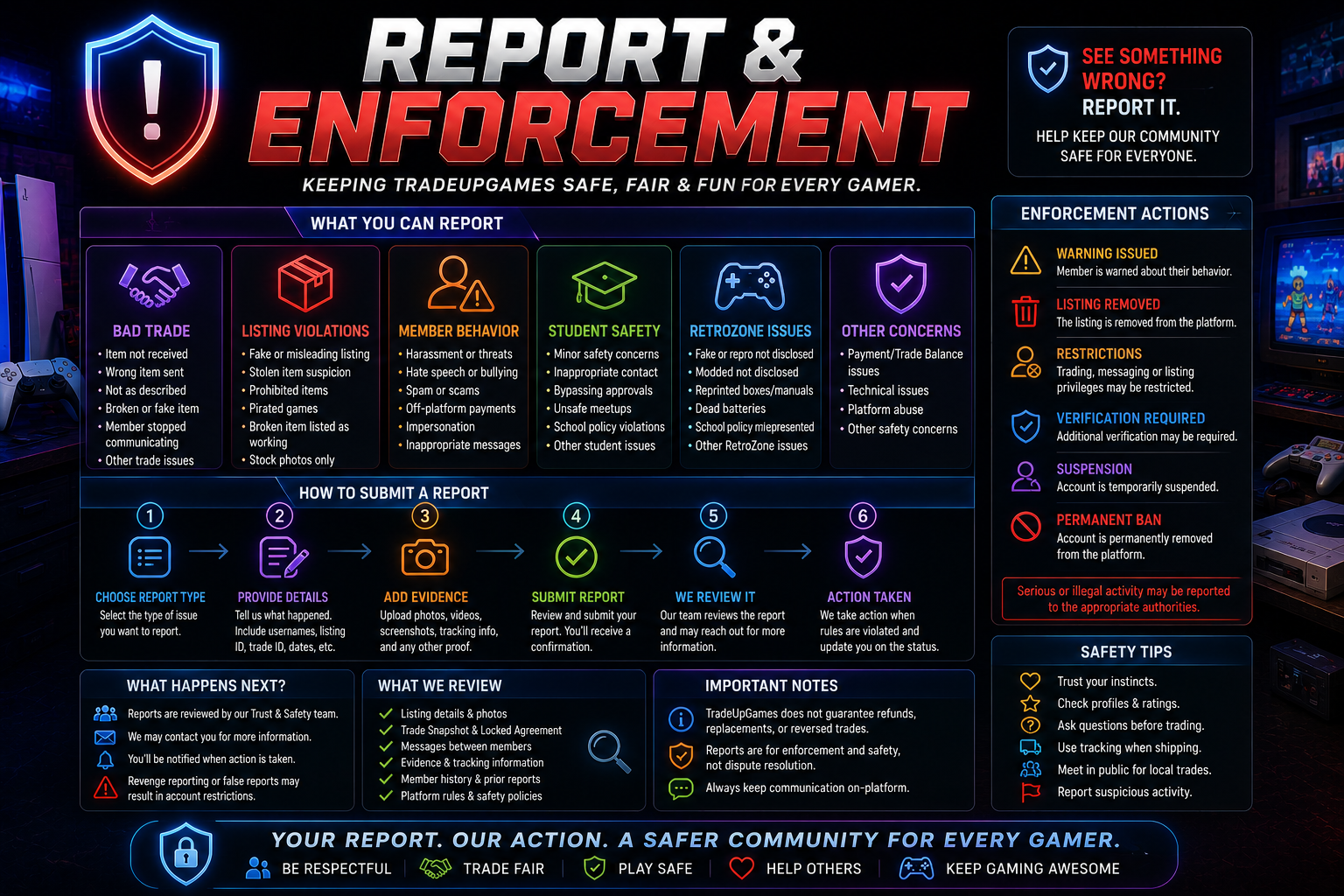
TradeUpGames is a peer-to-peer gaming trade platform. Members trade directly with each other, and every trade is completed at each member's own risk. The Report & Enforcement Safety Center helps protect the community by allowing members to report bad trades, fake listings, prohibited items, harassment, unsafe behavior, and suspicious activity. TradeUpGames may review reports and take action against accounts that violate platform rules.
What You Can Report
Bad Trade Reports
Use this if a completed or active trade has a serious problem.
- •Item never arrived
- •Wrong item sent
- •Item does not work
- •Item not as described
- •Missing accessories
- •Missing game case/manual
- •Broken console
- •Controller drift
- •Fake item
- •Counterfeit item
- •Reproduction item not disclosed
- •Damaged item listed as working
- •Member stopped responding after agreement
- •Suspicious shipping behavior
Listing Reports
Use this if a listing appears dishonest, unsafe, fake, or prohibited.
- •Fake listing
- •Stolen item suspicion
- •Pirated game
- •Counterfeit item
- •Digital account listing
- •Password/login trade
- •Gift card or code listing
- •Broken item listed as working
- •Misleading photos
- •Stock photos only
- •Wrong platform or title
- •Non-gaming item
- •Offensive content
- •Scam language
Member Behavior Reports
Use this if another member violates community standards.
- •Harassment
- •Threats
- •Bullying
- •Hate speech
- •Sexual messages
- •Spam
- •Repeated unwanted messages
- •Pressure to trade
- •Pressure to pay off-platform
- •Unsafe local meetup behavior
- •Sharing private information
- •Impersonation
- •Fake profile
- •Suspicious account activity
High School / Student Safety Reports
Use this for student-related safety concerns. Student safety reports should receive priority review.
- •Minor trading without approval
- •Adult contacting student inappropriately
- •Parent approval bypass attempt
- •Unsafe school meetup
- •Harassment in school community
- •Fake student account
- •Campus or school rule violation
- •Off-platform messaging pressure
- •High-value trade without approval
RetroZone Reports
RetroZone reports may include:
- •Fake retro item
- •Reproduction not disclosed
- •Modded console not disclosed
- •Reprinted box/manual not disclosed
- •Dead save battery not disclosed
- •Region compatibility issue not disclosed
- •Disc resurfacing not disclosed
- •Collector item misrepresented
- •Sealed item appears fake
- •Graded item appears fake
- •High-value trade concern
How to Submit a Report
Step 1: Choose Report Type
Select one:
- •Report a trade
- •Report a listing
- •Report a member
- •Report a message
- •Report a RetroZone item
- •Report a student safety concern
- •Report a payment or Trade Balance issue
- •Report a local meetup concern
Step 2: Provide Details
Include:
- •Trade ID, if available
- •Listing ID, if available
- •Member username
- •Item name
- •Platform/system
- •What happened
- •Date of issue
- •Shipping/local trade details
- •Any messages or screenshots
- •What rule you believe was violated
Step 3: Upload Evidence
Helpful evidence includes:
- •Photos of the item
- •Photos of damage
- •Proof the item does not work
- •Packaging photos
- •Shipping receipt
- •Tracking number
- •Screenshots
- •Chat messages
- •Video proof
- •Listing screenshots
- •Comparison to listing description
The more detail you provide, the easier it is for TradeUpGames to review the report.
Step 4: Submit Report
After submitting, the report will appear in your account under My Reports. Report statuses may include:
- •Submitted
- •Under review
- •Waiting for more information
- •Action taken
- •Closed
- •Dismissed
- •Escalated
What TradeUpGames May Review
When a report is submitted, TradeUpGames may review:
- Listing details
- Trade Snapshot
- Locked Trade Agreement
- Chat history inside TradeUpGames
- Photos and videos
- Tracking details
- Member ratings
- Account history
- Prior reports
- Verification status
- Platform activity
- Safety rule acknowledgments
TradeUpGames cannot fully review conversations or agreements made outside the platform. Keep trade communication inside TradeUpGames.
Possible Enforcement Actions
Depending on the issue, TradeUpGames may:
- →Remove a listing
- →Send a warning
- →Restrict messaging
- →Restrict listing access
- →Restrict trade offers
- →Require additional verification
- →Require proof photos or videos
- →Pause high-value trading access
- →Remove RetroZone access
- →Remove Campus access
- →Remove High School Arena access
- →Suspend the account
- →Permanently ban the account
- →Block related accounts
- →Remove reviews that violate policy
- →Escalate serious safety concerns
What TradeUpGames Does Not Do
TradeUpGames does not guarantee:
- Refunds
- Replacements
- Repairs
- Reimbursements
- Forced returns
- Reversed trades
- Successful trade outcomes
- Fair trade values
- Item authenticity
- Item condition
- Delivery
- Shipping carrier performance
- Report outcomes
TradeUpGames may take action against bad accounts, but members are responsible for deciding who they trade with.
Report Abuse Policy
The report system is for real safety, trade, and rule concerns. Members may not:
- File fake reports
- Use reports to harass another member
- Threaten reports to force a trade
- Report someone because they declined an offer
- Report someone because of trade regret
- Submit edited or fake evidence
- Use reports to manipulate ratings
- Abuse safety tools
False or abusive reporting may lead to restrictions or suspension.
Emergency Safety Reminder
If you believe you are in immediate danger, contact local emergency services first. TradeUpGames can review platform-related behavior, but we cannot respond to emergencies in real time or physically intervene in local meetups.
Safety Center
Trade Smart. Trade Safe. Trade at Your Own Risk. Visit the Safety Center for the full checklist, shipping & local trade tips, and high-value trade guidance.